
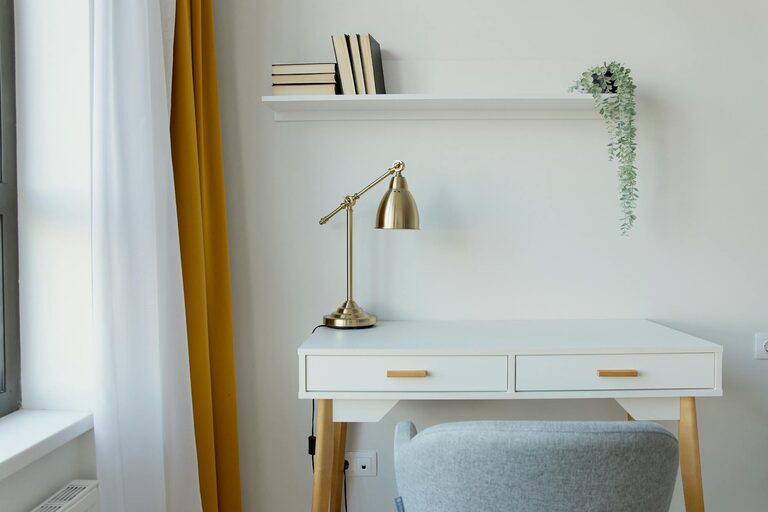
Creating a cozy and functional home workspace is essential for anyone working from home, studying, or managing personal projects. A thoughtfully designed space can boost your focus, reduce stress, and make working from home more enjoyable. Whether you have a dedicated room or a small corner, these tips will help you transform your area into an inviting and efficient workspace.
Choose the Right Location
The first step is selecting a spot that fits your needs. Ideally, a home workspace should be:
– Quiet and low-traffic: Choose a space away from distractions and household noise to maintain concentration.
– Near natural light: Position your desk near a window if possible. Natural light helps reduce eye strain and improves mood.
– Adequate space: Ensure the area has enough room for your desk, chair, and essentials without feeling cramped.
If you don’t have a spare room, consider using a section of your living room, bedroom, or dining area. Use room dividers or shelving units to separate your workspace from other areas.
Invest in Comfortable and Ergonomic Furniture
Comfort is key for long hours of work. When shopping for furniture, keep these points in mind:
– Desk: Choose a desk that suits your work style and fits your space. Adjustable desks are great for alternating between sitting and standing.
– Chair: Opt for an ergonomic chair that supports your back and encourages good posture. Look for adjustable height, lumbar support, and cushioned seating.
– Monitor stand or riser: Position your computer screen at eye level to prevent neck strain.
– Footrest: If your feet don’t touch the ground comfortably, a footrest can improve posture and circulation.
Investing in ergonomic furniture pays off by reducing discomfort and increasing productivity.
Organize for Efficiency
A cluttered desk can be distracting and stressful. Keeping your workspace organized helps you stay focused and find things quickly.
– Use storage solutions: Drawer organizers, shelves, or filing cabinets help keep papers and supplies sorted.
– Declutter regularly: Remove unnecessary items to maintain a clean surface.
– Cable management: Use clips, ties, or sleeves to manage cords and chargers neatly.
– Daily reset: Spend a few minutes at the end of each day tidying your workspace to start fresh tomorrow.
Personalize Your Space
Adding personal touches makes your workspace inviting and motivating.
– Decorate with plants: Indoor plants add color and improve air quality.
– Use artwork or photos: Adding images you love can inspire creativity.
– Choose a calming color scheme: Soft, neutral colors reduce stress, while pops of color can energize the space.
– Add cozy elements: A soft rug, cushions, or a warm blanket can make the area more comfortable.
Remember to balance personalization with avoiding clutter.
Optimize Lighting
Good lighting reduces eye strain and enhances focus.
– Maximize natural light: Keep windows unobstructed and add light curtains to diffuse harsh sunlight.
– Task lighting: Use adjustable desk lamps with warm or neutral white light to brighten your work area.
– Ambient lighting: Overhead lights or floor lamps provide general illumination and reduce contrast on your screen.
Avoid glare on your computer screen, which can cause discomfort and headaches.
Set Boundaries and Create a Routine
Having a defined workspace helps separate work from personal life, especially in a home setting.
– Define your work hours: Stick to a schedule and communicate it to others in your household.
– Use the space only for work: This trains your brain to associate the area with productivity.
– Take breaks: Step away from your desk regularly for stretching and relaxation.
– End of day ritual: Signal the end of work by tidying your desk or closing your laptop.
These habits support mental clarity and work-life balance.
Keep Technology Updated and Accessible
Reliable and user-friendly technology minimizes frustration.
– Invest in quality equipment: A fast computer, high-resolution monitor, and good headphones or speakers improve your experience.
– Use wireless accessories: Wireless keyboards and mice reduce cable clutter.
– Maintain connectivity: Position your router smartly or use a wired connection for stable internet.
– Backup your data: Use cloud storage or external drives to protect important files.
Having your tools ready to go saves time and keeps you productive.
Incorporate Healthy Habits
Your workspace should support your well-being.
– Adjustable standing desks: Allows you to alternate sitting and standing positions.
– Ergonomic accessories: Wrist rests, anti-fatigue mats, and monitor stands help reduce strain.
– Proper ventilation: Fresh air keeps the environment comfortable.
– Hydration station: Keep a water bottle nearby to stay hydrated throughout the day.
Small adjustments can have a big impact on your health.
—
By carefully selecting your location, investing in ergonomic furniture, organizing efficiently, and personalizing your area, you can create a home workspace that feels both cozy and functional. Small improvements in lighting, technology, and daily habits will enhance your comfort and productivity, making your work-from-home experience more enjoyable and effective.